Binance.US connection
For the described Samson configuration, enable Read and Spot Trading; leave Withdrawals disabled. Use Samson's secure post-payment setup process.
SAMSON · HELP & EDUCATION
Learn how Samson connects to your exchange, manages trading allocations, and helps you get started.
GUIDED HELP · PREVIEW
Select a question below. These are prewritten educational answers, not a live AI conversation. A secure AI assistant is planned for a later release.
Choose a question above to get started. Never provide API keys, API secrets, passwords, or payment credentials in a chat.
BINANCE.US · CUSTOMER SETUP GUIDE
After your Standard or Pro account is created and payment is complete, Samson emails you the instructions and a link to the secure onboarding form. Complete API configuration directly on Binance.US; submit the credentials only through the secure Samson form, never through this Help Center or email.
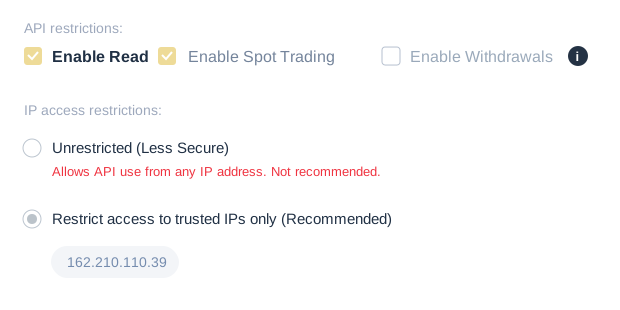
162.210.110.39. Use the address given in your latest authenticated onboarding instructions if it changes.Security: Never share API keys or secrets in chat, email, or support messages. Restricting the API key to Samson's approved IP and disabling withdrawals reduces certain risks but does not eliminate trading losses. Samson's configured trading allocation is enforced internally, not by Binance.US.
For the described Samson configuration, enable Read and Spot Trading; leave Withdrawals disabled. Use Samson's secure post-payment setup process.
Samson enforces the configured allocation internally—not as an exchange-level spending cap. The customer retains control of the exchange account.
For eligible configurations, usually Pro and Enterprise, scaling uses only eligible realized net gains from Samson trading after fees—not unrealized gains or external deposits.
Cryptocurrency trading involves substantial risk of loss. Samson seeks profitable exits rather than intentionally selling at a loss, but open positions may fall in value, remain open indefinitely, or never recover. No profit or recovery is guaranteed. Information is educational, not financial, legal, tax, or investment advice. Exchange availability and eligibility vary.