Account & Equity Overview
See account equity, available USD balance, realized and unrealized profit and loss, fees paid, running time, position count, and open-order count from a single summary area.
See an illustrative walkthrough of the Samson trading interface, including portfolio telemetry, independent position management, execution visibility, recovery states, and performance reporting.
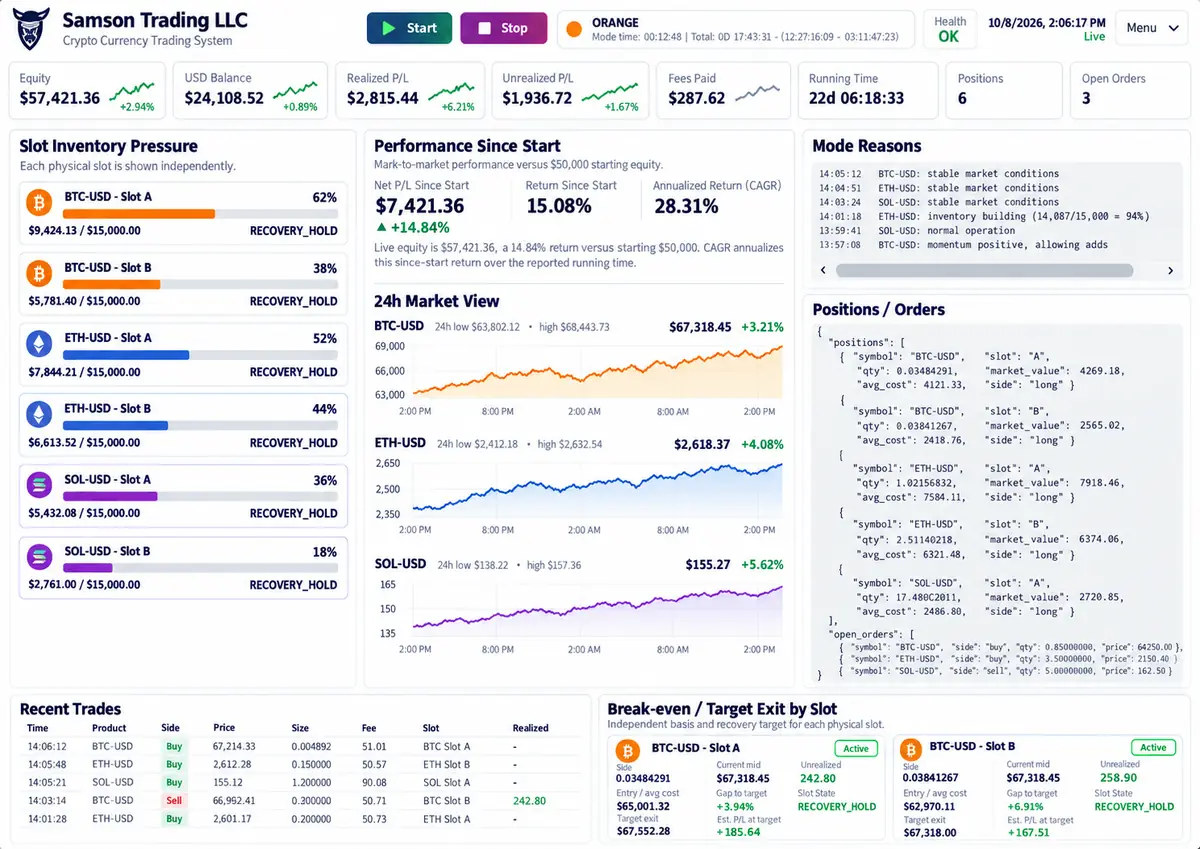
Samson is designed to make the state of the system understandable. The interface combines account information, position state, market conditions, execution history, risk controls, and recovery targets in one operating view.
See account equity, available USD balance, realized and unrealized profit and loss, fees paid, running time, position count, and open-order count from a single summary area.
Each physical inventory slot is tracked independently so its allocation, market value, recovery state, and capital utilization can be evaluated without collapsing every position into one number.
Samson continuously evaluates market conditions and surfaces the state of its risk controls. GeoRisk adds geopolitical-risk context, market-stabilization and shock telemetry, and an acquisition gate that can restrict new buys when risk conditions warrant. The dashboard also surfaces the reasons behind its current operating mode, including liquidity, market stability, inventory pressure, and other safety gates.
Track mark-to-market performance from the configured starting equity, including profit and loss, return since start, and longer-horizon performance context.
Price charts provide an at-a-glance view of the markets Samson is monitoring so current portfolio behavior can be viewed alongside the underlying market environment.
Inspect current positions, market values, sides, active orders, and other execution state required to understand what the system is managing at any moment.
Samson records completed trade activity with time, product, side, price, size, fees, slot identity, and realized results for operational review.
Each position can show its break-even level, current price, unrealized state, target exit, capital-to-target requirement, and recovery status independently.
Samson is designed to manage positions patiently rather than forcing unnecessary exits simply because the market moved against an earlier entry.
Samson connects to the customer's exchange through API credentials created by the customer. The customer controls the exchange account and can revoke the API credentials.
Normal Samson operation does not require the customer's online banking username, banking password, routing number, bank account number, or debit-card credentials.
Trading capital remains in the customer's exchange account.